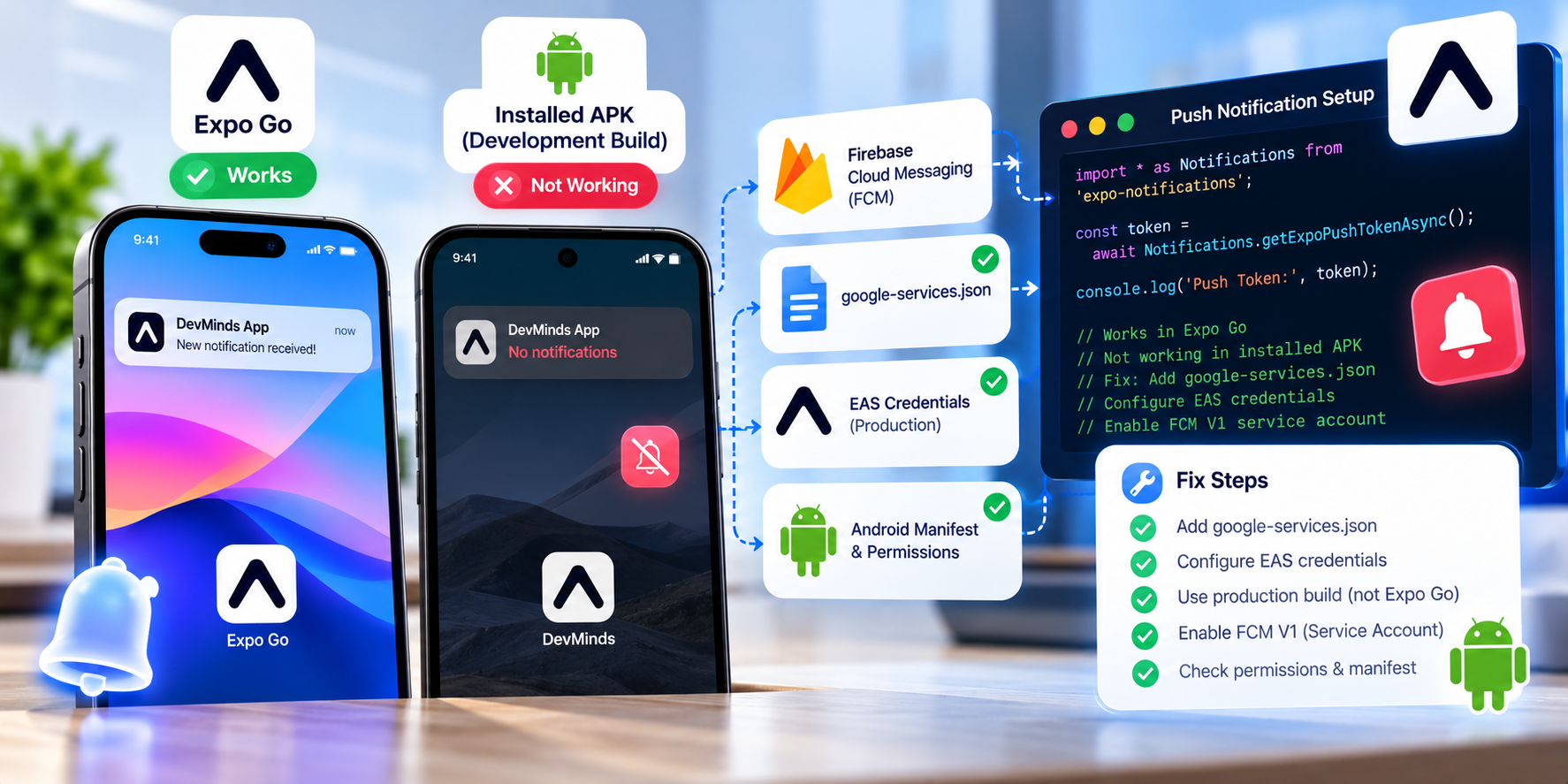
When upgrading React Native applications to Expo SDK 53 and newer, one of the most frequent blocking errors developers encounter is push notification failure inside the standard Expo Go client app. Calls to Notifications.getExpoPushTokenAsync() or Notifications.getDevicePushTokenAsync() often throw runtime exceptions or return invalid tokens, leaving engineers wondering why functionality that worked seamlessly in earlier versions has suddenly broken.
Understanding the root cause requires examining how mobile operating systems have evolved their security requirements, why Google deprecated the legacy Firebase Cloud Messaging (FCM) API in favor of FCM HTTP v1, and why sandboxed client runners like Expo Go can no longer support push notifications out-of-the-box.
What You'll Learn
- Why Expo SDK 53+ deprecates push notifications in the Expo Go client
- Google FCM HTTP v1 and Android 14 notification permission mandates
- Architectural differences between Expo Go and EAS Development Builds
- Step-by-step migration to a custom Development Build (
expo-dev-client) - Production-grade notification listener and token registration implementation
- Critical credentials setup for Apple APNs and Firebase Cloud Messaging
Why This Matters
Push notifications represent one of the most critical engagement and transactional communication channels in production mobile applications. Whether sending OTPs, payment confirmations, or messaging alerts, notification reliability directly impacts user retention and system trust.
In Expo SDK 53+, Expo completed its planned architectural transition to align with modern native platform requirements. Google's deprecation of the legacy FCM server keys and mandatory adoption of service account credentials (FCM HTTP v1) means that push notification infrastructure requires your own native credentials (google-services.json on Android and APNs keys on iOS). Because Expo Go is a shared, pre-compiled sandbox binary signed by Expo's developer credentials, it cannot carry your application's private Firebase and Apple credentials.
Root Cause: Why Expo Go Breaks in SDK 53
Developers attempting to test push notifications in Expo Go after upgrading to SDK 53 typically see errors such as:
Error: Encountered an error while fetching the push token:
Default FirebaseApp is not initialized in this process. Make sure to call FirebaseApp.initializeApp().
or:
[Unhandled promise rejection: Error: Notifications are not supported in Expo Go on Android SDK 53+]
This breakdown occurs due to three structural factors:
- Google FCM HTTP v1 Requirement: Push notifications on Android now require a direct relationship between the client app's
applicationIdand a Firebase Service Account key. A generic third-party binary (Expo Go) cannot broker this without exposing security risks. - Android 13+ & 14 Runtime Permissions:
POST_NOTIFICATIONSruntime permissions and foreground service notification policies require deep native manifest declarations configured at compile time. - Expo Go Sandboxing Limits: Expo Go was created for rapid prototyping of UI components, not for testing native-bound operating system services like custom notification channels, background message handlers, or APNs device credentials.
Core Concepts & Architecture: Expo Go vs Development Build
The solution is transitioning from Expo Go to an EAS Development Build (expo-dev-client).
| Feature | Expo Go | EAS Development Build |
|---|---|---|
| Native Runtime | Pre-compiled generic sandbox | Custom native binary compiled specifically for your app |
| Package ID / Bundle ID | host.exp.exponent |
Your real in.devminds.app |
| Firebase / FCM Credentials | Not supported in SDK 53+ | Full native google-services.json support |
| Apple APNs Keys | Shared testing keys only | Production .p8 Auth Key support |
| Custom Native Code | Not permitted | Unlimited native modules, libraries & plugins |
| Fast Refresh & Dev Tools | Yes | Yes (identical developer experience) |
An EAS Development Build gives you the exact same fast-refresh, Metro-bundling workflow as Expo Go, but within a binary that is compiled with your actual app.json configuration, native plugins, and credentials.
Step-by-Step Fix & Implementation
Step 1: Install Required Dependencies
Ensure you have the latest SDK 53-compatible packages installed via the Expo CLI:
npx expo install expo-notifications expo-device expo-constants expo-dev-client
Step 2: Configure app.json Plugins
In your app.json or app.config.ts, declare the expo-notifications plugin and your native configuration files:
{
  "expo": {
    "name": "DevMinds App",
    "slug": "devminds-app",
    "version": "1.0.0",
    "ios": {
      "bundleIdentifier": "in.devminds.app",
      "supportsTablet": true
    },
    "android": {
      "package": "in.devminds.app",
      "googleServicesFile": "./google-services.json",
      "permissions": ["RECEIVE_BOOT_COMPLETED", "POST_NOTIFICATIONS"]
    },
    "plugins": [
      [
        "expo-notifications",
        {
          "icon": "./assets/notification-icon.png",
          "color": "#0052E0",
          "defaultChannel": "default"
        }
      ]
    ]
  }
}
Step 3: Configure Notification Handler & Channel
In Android 8.0+ (API level 26+), all notifications must be assigned to a notification channel. Configure this in your application entry point before requesting tokens:
import * as Notifications from 'expo-notifications';
import { Platform } from 'react-native';

// Set notification behavior when app is in foreground
Notifications.setNotificationHandler({
  handleNotification: async () => ({
    shouldShowAlert: true,
    shouldPlaySound: true,
    shouldSetBadge: false,
  }),
});
Practical Code Example
Below is a robust, production-tested hook for registering for push notifications, configuring Android notification channels, and capturing tokens safely:
import { useState, useEffect, useRef } from 'react';
import { Platform } from 'react-native';
import * as Device from 'expo-device';
import * as Notifications from 'expo-notifications';
import Constants from 'expo-constants';

export function usePushNotifications() {
  const [expoPushToken, setExpoPushToken] = useState<string | null>(null);
  const [notification, setNotification] = useState<Notifications.Notification | null>(null);
  const notificationListener = useRef<Notifications.Subscription | null>(null);
  const responseListener = useRef<Notifications.Subscription | null>(null);

  useEffect(() => {
    registerForPushNotificationsAsync().then((token) => {
      if (token) setExpoPushToken(token);
    });

    // Listener for notifications received while app is foregrounded
    notificationListener.current = Notifications.addNotificationReceivedListener((notif) => {
      setNotification(notif);
    });

    // Listener for user interactions (tapping on notification)
    responseListener.current = Notifications.addNotificationResponseReceivedListener((response) => {
      const data = response.notification.request.content.data;
      console.log('User tapped notification with payload:', data);
    });

    return () => {
      if (notificationListener.current) {
        Notifications.removeNotificationSubscription(notificationListener.current);
      }
      if (responseListener.current) {
        Notifications.removeNotificationSubscription(responseListener.current);
      }
    };
  }, []);

  return { expoPushToken, notification };
}

async function registerForPushNotificationsAsync(): Promise<string | null> {
  // Push notifications require a physical device
  if (!Device.isDevice) {
    console.warn('Push notifications require a physical mobile device, not an emulator.');
    return null;
  }

  // 1. Android Notification Channel setup
  if (Platform.OS === 'android') {
    await Notifications.setNotificationChannelAsync('default', {
      name: 'Default Notifications',
      importance: Notifications.AndroidImportance.MAX,
      vibrationPattern: [0, 250, 250, 250],
      lightColor: '#0052E0',
      enableLights: true,
      enableVibrate: true,
    });
  }

  // 2. Request permission
  const { status: existingStatus } = await Notifications.getPermissionsAsync();
  let finalStatus = existingStatus;

  if (existingStatus !== 'granted') {
    const { status } = await Notifications.requestPermissionsAsync();
    finalStatus = status;
  }

  if (finalStatus !== 'granted') {
    console.warn('Failed to obtain push notification permissions from user.');
    return null;
  }

  // 3. Resolve project ID and fetch Expo Push Token
  const projectId =
    Constants?.expoConfig?.extra?.eas?.projectId ??
    Constants?.easConfig?.projectId;

  if (!projectId) {
    console.error('Project ID not found in app.json. Ensure EAS project is linked.');
  }

  try {
    const pushTokenData = await Notifications.getExpoPushTokenAsync({
      projectId,
    });
    return pushTokenData.data;
  } catch (error) {
    console.error('Error fetching Expo Push Token:', error);
    return null;
  }
}
Production Considerations & EAS Build Setup
To run your code in a native Development Build rather than Expo Go:
1. Configure eas.json for Development
In your project root, configure your development profile in eas.json:
{
  "cli": {
    "version": ">= 12.0.0"
  },
  "build": {
    "development": {
      "developmentClient": true,
      "distribution": "internal"
    },
    "preview": {
      "distribution": "internal"
    },
    "production": {}
  }
}
2. Generate and Run the Development Binary
Run the EAS build command to create your development client:
# For Android APK (runs directly on physical devices)
eas build --profile development --platform android

# For iOS Simulator or Ad-Hoc device
eas build --profile development --platform ios
Once installed on your phone, start Metro with:
npx expo start --dev-client
Open the custom DevMinds development app on your device and scan the terminal QR code. Push notifications and FCM tokens will now resolve with zero errors.
Performance, Security & Scalability
- Token Persistence: Always transmit the generated
ExpoPushTokento your backend alongside the authenticated user ID and device platform (iosorandroid). Store tokens with anupdatedAttimestamp and index by user ID. - Handle Inactive Tokens: When dispatching batch notifications via Expo's push service or FCM HTTP v1, inspect the response tickets. Immediately delete or deactivate tokens that return
DeviceNotRegistered. - Payload Size: Keep push notification payloads under 4KB. Store heavy payload state in your backend database and send only entity identifiers in the notification
dataobject.
Common Mistakes
- Testing in Android Emulator or iOS Simulator: Push notification tokens cannot be generated on simulated environments; physical hardware is strictly required.
- Missing
projectIdparameter: In SDK 53+, omitting{ projectId }when invokinggetExpoPushTokenAsync()causes an unhandled promise rejection. - Skipping Notification Channel setup on Android: Failing to call
setNotificationChannelAsync()causes notifications to silently drop on Android 8.0+.
Best Practices
- Graceful Permission Requests: Do not request push permissions on the first screen launch. Educate users first with a contextual in-app prompt explaining the value.
- Use Development Builds as the Standard: Default your team's workflow to EAS Development Builds (
expo-dev-client) from day one to eliminate sandbox discrepancies. - Secure Service Account JSONs: Never commit your
google-services.jsonor Apple APNs keys to public repositories. Manage them using EAS Secrets or environment variables.
Conclusion
The deprecation of push notifications inside Expo Go in SDK 53+ is a positive evolution towards production parity and security standards. By configuring the expo-notifications plugin and utilizing EAS Development Builds, engineering teams achieve a reliable, native-grade push notification architecture while preserving Expo's rapid development speed.
Sources & References
- Expo Push Notifications Official Documentation (Official Documentation)
- Migrating to FCM HTTP v1 with Expo (Migration Guide)
- EAS Development Builds Guide (Official Guide)