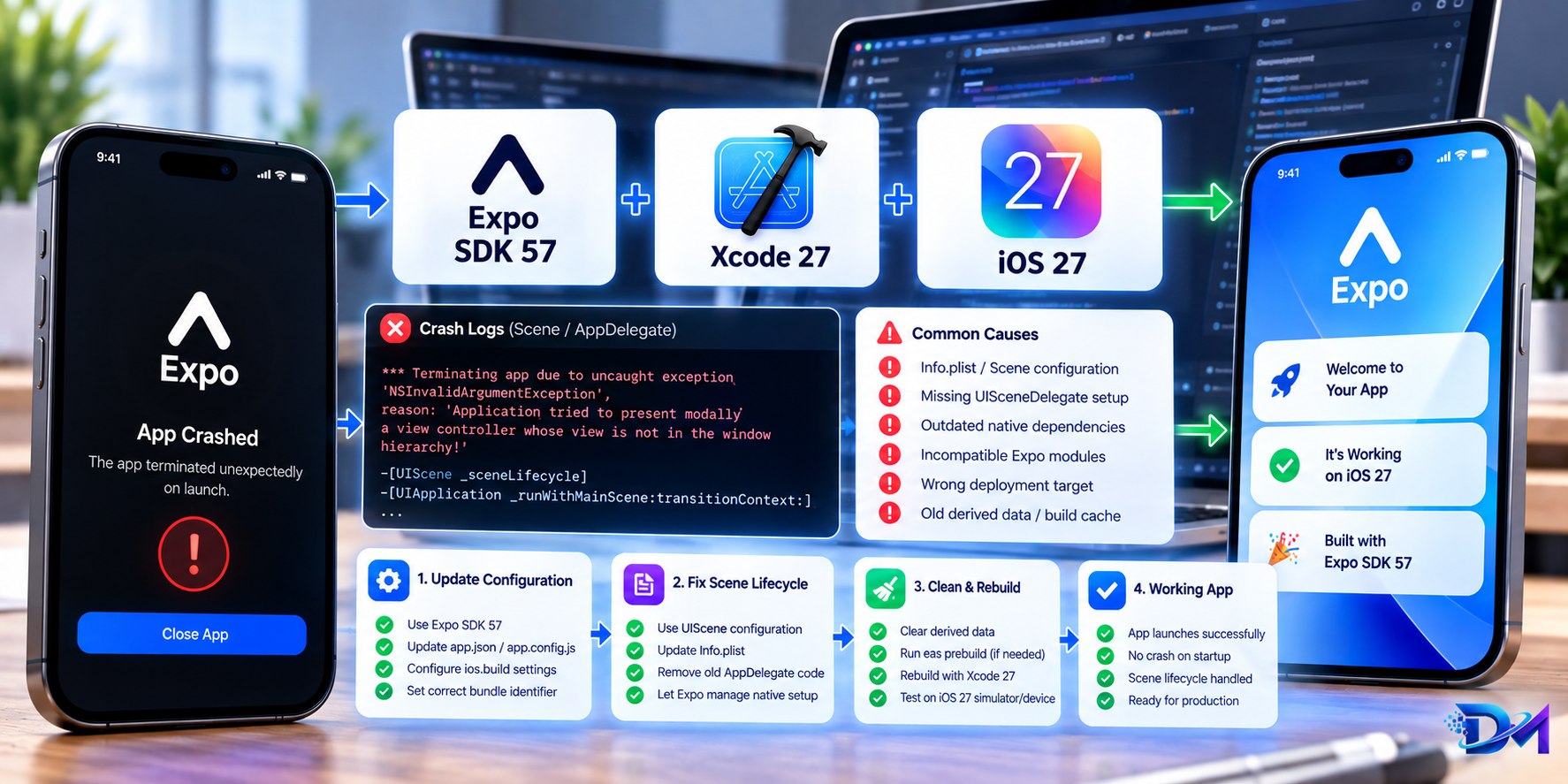
Upgrading React Native applications to Expo SDK 57 alongside the latest Xcode tooling frequently triggers a fatal crash immediately upon app launch on iOS. Instead of displaying the splash screen or initial screen, the application terminates instantly with native exceptions referencing UIWindowScene, rootViewController, or missing scene delegates.
This guide breaks down why the transition to modern iOS scene lifecycles causes this crash, how the React Native Bridgeless / Fabric engine interacts with window scenes, and the exact steps to resolve it using Expo config plugins and native delegate configurations.
What You'll Learn
- The root cause of the launch crash in Expo SDK 57 on modern iOS runtimes
- Differences between legacy
UIApplicationDelegateand modernUIWindowSceneDelegate - How to diagnose the
NSInternalInconsistencyExceptionandnil rootViewControllercrash - Step-by-step fix using Expo prebuild & custom config plugins
- Adapting
expo-splash-screen, orientations, and deep linking for scene lifecycle - Validating the fix with an EAS Development Build
The Crash Signature
When launching an app built with Expo SDK 57 and recent Xcode toolchains on iOS devices or simulators, developers typically encounter one of two immediate fatal crashes in the Xcode console:
*** Terminating app due to uncaught exception 'NSInternalInconsistencyException',
reason: 'Application has a scene manifest, but its delegate does not implement
scene:willConnectToSession:options:'
or when accessing the window hierarchy before scene initialization:
Fatal error: Unexpectedly found nil while unwrapping an Optional value:
UIWindow.rootViewController must not be nil when making key and visible.
Thread 1: signal SIGABRT in AppDelegate.swift
In release builds or on TestFlight, the app appears to flash a black or blank white screen for 100ms before silently crashing back to the iOS home screen.
Root Cause: The Window Scene Paradigm Shift
To understand why this happens, consider how iOS application lifecycle architecture has shifted:
1. Legacy Lifecycle (UIApplicationDelegate)
Historically, iOS applications had a single window (UIWindow) owned directly by AppDelegate. In application(_:didFinishLaunchingWithOptions:), React Native initialized its bridge or TurboModule runtime, created a root view controller, attached it to self.window, and called makeKeyAndVisible().
2. Modern Scene Lifecycle (UIWindowSceneDelegate)
Apple decoupled the application lifecycle from the user interface lifecycle to support multi-window workflows, Stage Manager, and modern system multitasking. Under this model:
UIApplicationDelegatehandles process lifecycle (launch, termination, push tokens).UIWindowSceneDelegate(SceneDelegate) handles UI windows, view controllers, and scene connections.
If your Xcode project or any native pod dependency includes a UIApplicationSceneManifest key in Info.plist, iOS skips standard window creation in AppDelegate and expects the window to be configured within scene(_:willConnectTo:options:).
In Expo SDK 57, when native plugins or updated dependencies introduce scene manifests without a synchronized SceneDelegate or when legacy code attempts to access UIApplication.shared.keyWindow before the scene connects, the app crashes immediately.
Step-by-Step Resolution
Step 1: Check Your app.json Configuration & Plugins
Inspect your app.json to ensure plugin declarations do not inject conflicting scene manifests while your project runs on standard AppDelegate architecture.
If your application does not require iPad multi-window / Stage Manager split screens, you can explicitly disable scene manifests via an Expo Config Plugin:
{
  "expo": {
    "name": "DevMinds App",
    "slug": "devminds-app",
    "ios": {
      "supportsTablet": false,
      "bundleIdentifier": "com.devminds.app",
      "infoPlist": {
        "UIApplicationSceneManifest": {
          "UIApplicationSupportsMultipleScenes": false,
          "UISceneConfigurations": {}
        }
      }
    }
  }
}
Step 2: Implement a Modern Scene-Compatible Config Plugin
For apps that support iPad multitasking or require full scene compatibility with SDK 57, create a custom Expo config plugin to wire up AppDelegate and SceneDelegate cleanly:
Create plugins/withIosSceneSupport.js:
// plugins/withIosSceneSupport.js
const { withInfoPlist, withDangerousMod } = require('@expo/config-plugins');
const fs = require('fs');
const path = require('path');

const withIosSceneSupport = (config) => {
  // 1. Configure Info.plist scene manifest
  config = withInfoPlist(config, (config) => {
    config.modResults.UIApplicationSceneManifest = {
      UIApplicationSupportsMultipleScenes: false,
      UISceneConfigurations: {
        UIWindowSceneSessionRoleApplication: [
          {
            UISceneConfigurationName: 'Default Configuration',
            UISceneDelegateClassName: '$(PRODUCT_MODULE_NAME).SceneDelegate',
          },
        ],
      },
    };
    return config;
  });

  // 2. Generate SceneDelegate.swift if missing
  config = withDangerousMod(config, [
    'ios',
    async (config) => {
      const projectRoot = config.modRequest.projectRoot;
      const projectName = config.modRequest.projectName;
      const iosDir = path.join(projectRoot, 'ios', projectName);

      const sceneDelegatePath = path.join(iosDir, 'SceneDelegate.swift');

      const sceneDelegateCode = `import UIKit
import ExpoModulesCore

class SceneDelegate: UIResponder, UIWindowSceneDelegate {
    var window: UIWindow?

    func scene(_ scene: UIScene, willConnectTo session: UISceneSession, options connectionOptions: UIScene.ConnectionOptions) {
        guard let windowScene = (scene as? UIWindowScene) else { return }

        let window = UIWindow(windowScene: windowScene)
        self.window = window

        // Forward scene lifecycle to Expo modules & React Native
        let delegate = UIApplication.shared.delegate as? AppDelegate
        if let rootView = delegate?.rootView {
            let rootViewController = UIViewController()
            rootViewController.view = rootView
            window.rootViewController = rootViewController
            window.makeKeyAndVisible()
        }
    }

    func scene(_ scene: UIScene, openURLContexts URLContexts: Set<UIOpenURLContext>) {
        guard let url = URLContexts.first?.url else { return }
        ExpoModulesCore.AppContext.onDeepLink(url)
    }
}
`;

      if (!fs.existsSync(sceneDelegatePath)) {
        fs.writeFileSync(sceneDelegatePath, sceneDelegateCode, 'utf8');
      }
      return config;
    },
  ]);

  return config;
};

module.exports = withIosSceneSupport;
Add the plugin to app.json:
{
  "expo": {
    "plugins": ["./plugins/withIosSceneSupport"]
  }
}
Step 3: Protect Splash Screen & Root View Initialization
One of the most common secondary crashes occurs when SplashScreen.preventAutoHideAsync() is called before the root view controller is mounted to the active scene window.
In your React Native entry point (index.js or App.tsx), ensure error resilience around the splash screen and window mount:
// App.tsx
import React, { useEffect, useState } from 'react';
import { View, Text, StyleSheet, Platform } from 'react-native';
import * as SplashScreen from 'expo-splash-screen';

// Prevent splash auto-hide with error boundary protection
SplashScreen.preventAutoHideAsync().catch((err) => {
  // Guard against early scene detachment on iOS
  console.warn('Splash screen preventAutoHide failed safely:', err);
});

export default function App() {
  const [appIsReady, setAppIsReady] = useState(false);

  useEffect(() => {
    async function prepare() {
      try {
        // Perform pre-flight initialization (fonts, auth state, local db)
        await new Promise((resolve) => setTimeout(resolve, 800));
      } catch (e) {
        console.warn('Initialization error:', e);
      } finally {
        setAppIsReady(true);
      }
    }

    prepare();
  }, []);

  useEffect(() => {
    if (appIsReady) {
      SplashScreen.hideAsync().catch(() => {});
    }
  }, [appIsReady]);

  if (!appIsReady) {
    return null;
  }

  return (
    <View style={styles.container}>
      <Text style={styles.title}>DevMinds Mobile Engine</Text>
      <Text style={styles.subtitle}>Expo SDK 57 • Scene Lifecycle Active</Text>
    </View>
  );
}

const styles = StyleSheet.create({
  container: { flex: 1, justifyContent: 'center', alignItems: 'center', backgroundColor: '#F8FAFC' },
  title: { fontSize: 20, fontWeight: '800', color: '#0F172A', marginBottom: 6 },
  subtitle: { fontSize: 13, color: '#0052E0', fontWeight: '600' },
});
Step 4: Clean Prebuild and Test
When modifying native iOS lifecycles and plugins, clear stale native cache and regenerate the ios/ directory:
# 1. Clean previous build artifacts
npx expo prebuild --clean --platform ios

# 2. Re-install CocoaPods
cd ios && pod install && cd ..

# 3. Compile local development build
npx expo run:ios
Or trigger a remote clean build via EAS:
eas build --profile development --platform ios --clear-cache
Comparison: AppDelegate vs SceneDelegate Architecture
| Responsibility | AppDelegate (UIApplicationDelegate) |
SceneDelegate (UIWindowSceneDelegate) |
|---|---|---|
| Process Lifecycle | didFinishLaunchingWithOptions |
sceneDidBecomeActive, sceneWillResignActive |
| Window Creation | Legacy (single screen only) | Modern UIWindowScene (multi-window, Stage Manager) |
| Root View Controller | Historical attachment point | Mounted in scene(_:willConnectTo:options:) |
| Deep Links / Universal Links | application(_:open:options:) |
scene(_:openURLContexts:) |
| Background Push Processing | Handled here | Not handled (process-level) |
Summary Checklist
- Audit
Info.plist: EnsureUIApplicationSceneManifestmatches your project architecture. - Handle Scene Delegation: If scene manifest is enabled, provide a valid
SceneDelegate.swiftimplementingscene(_:willConnectTo:options:). - Guard Splash Screen: Wrap
SplashScreen.preventAutoHideAsync()in a.catch()to prevent unhandled promise rejections on initial scene attachment. - Route Deep Links via Scene: Update deep link and URL context handlers to listen to scene URL contexts.
- Clean Prebuild: Always run
npx expo prebuild --cleanafter modifying scene lifecycle config plugins.