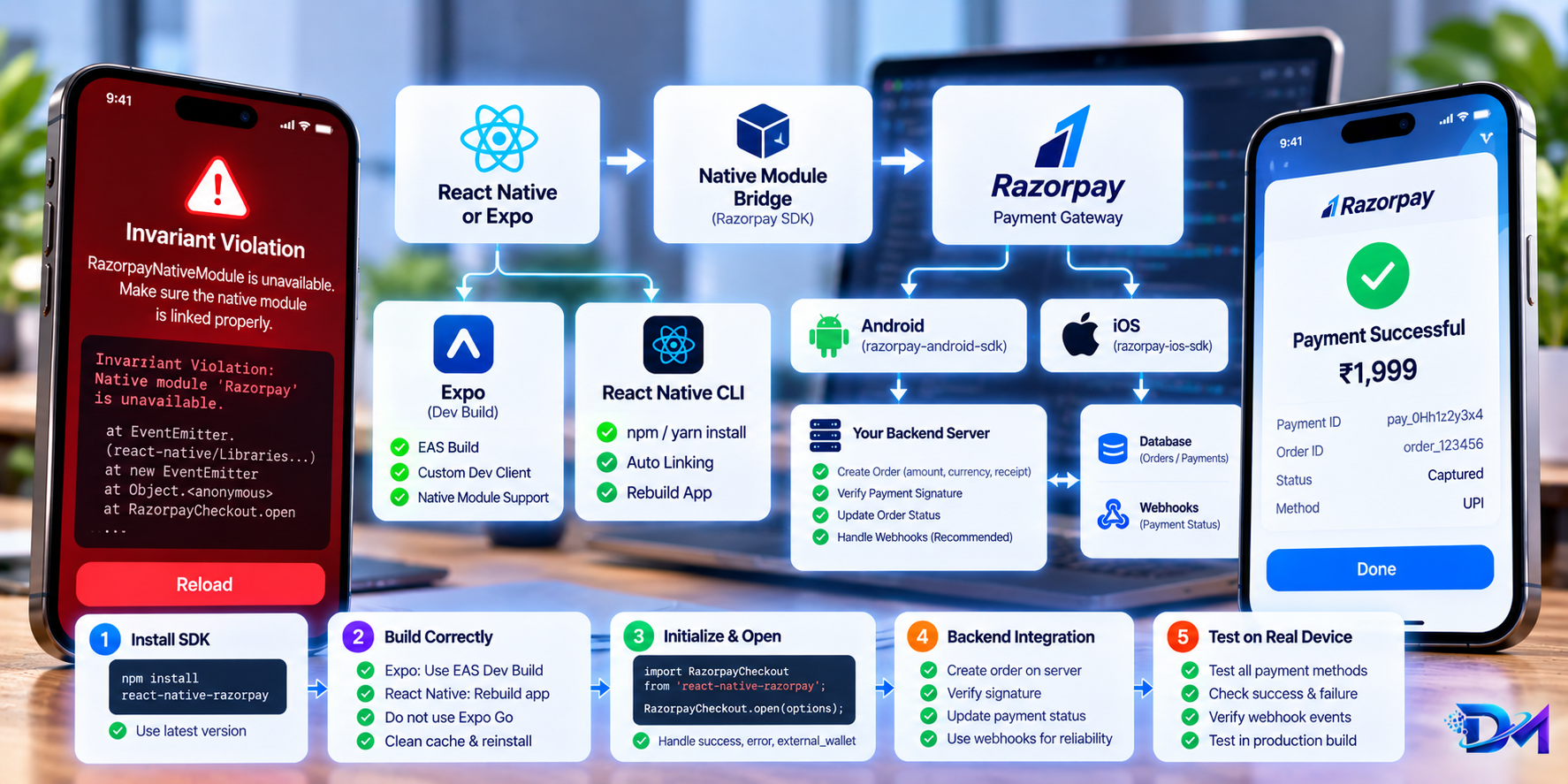
Integrating payment gateways in React Native should be straightforward, but developers upgrading to modern React Native (RN 0.74+, 0.76+, Expo SDK 50+) frequently hit a wall with react-native-razorpay.
When attempting to open the Razorpay checkout interface on Android, applications frequently crash or immediately reject the promise before the payment sheet appears.
What You'll Learn
- Why
react-native-razorpaythrowsNativeEventEmitterinvariant violations on Android - The architectural mismatch between iOS and Android event dispatchers in Razorpay
- How to implement a zero-dependency automated
postinstallpatch inpackage.json - Writing a production-grade, type-safe
openRazorpayTypeScript wrapper - Essential production gotchas: Expo Dev Clients, paise subunits, and PAN compliance
1. Introduction & The Problem
When trying to open the Razorpay payment gateway on Android, you often encounter one of these two errors:
Error 1: NativeEventEmitter Crash
Invariant Violation: `new NativeEventEmitter()` requires a non-null argument.
at node_modules/react-native-razorpay/RazorpayCheckout.js
Error 2: Native Module Unavailable Rejection
Razorpay native module is unavailable in this environment
Even when NativeModules.RNRazorpayCheckout is compiled into your Android APK or Development Build, Razorpay.open(...) still rejects immediately.
2. Why Does This Happen? (Root Cause Deep Dive)
If you inspect node_modules/react-native-razorpay/RazorpayCheckout.js, you'll find this line:
const razorpayEvents = new NativeEventEmitter(RazorpayEventEmitterModule);
The Architectural Mismatch
- iOS vs. Android Event Architecture:
- On iOS, Razorpay registers a dedicated
RazorpayEventEmitterModule. - On Android, Razorpay emits events globally directly through Android's native
DeviceEventEmitter(RCTDeviceEventEmitter). There is noRazorpayEventEmitterModuleon Android.
- On iOS, Razorpay registers a dedicated
- In React Native's modern runtime and New Architecture, passing
undefinedornulltonew NativeEventEmitter()throws a runtime invariant violation. - If an author patches it naively by setting
razorpayEvents = nullwhen the module is missing, Razorpay's internal validation check:
fails on Android becauseif (!RazorpayCheckoutModule || !razorpayEvents) { ... }razorpayEventsisnull!
3. The Solution: Automated Postinstall Patch
Instead of modifying node_modules manually (which gets wiped whenever you run yarn install or npm install), we create a zero-dependency script that runs automatically on every install.
Step 1: Create the Patch Script
Create a new file at scripts/patch-razorpay.js:
// scripts/patch-razorpay.js
const fs = require("fs");
const path = require("path");

const targetFile = path.resolve(
  __dirname,
  "../node_modules/react-native-razorpay/RazorpayCheckout.js"
);

if (fs.existsSync(targetFile)) {
  let content = fs.readFileSync(targetFile, "utf8");

  // 1. Import DeviceEventEmitter and Platform from 'react-native'
  if (content.includes("import { NativeModules, NativeEventEmitter } from 'react-native';")) {
    content = content.replace(
      "import { NativeModules, NativeEventEmitter } from 'react-native';",
      "import { NativeModules, NativeEventEmitter, DeviceEventEmitter, Platform } from 'react-native';"
    );
  }

  // 2. Use DeviceEventEmitter for Android and NativeEventEmitter for iOS
  if (
    content.includes("const razorpayEvents = new NativeEventEmitter(RazorpayEventEmitterModule);") ||
    content.includes("const razorpayEvents = RazorpayEventEmitterModule ?")
  ) {
    content = content.replace(
      /const razorpayEvents = [^;]+;/,
      "const razorpayEvents = Platform.OS === 'android' ? DeviceEventEmitter : (RazorpayEventEmitterModule ? new NativeEventEmitter(RazorpayEventEmitterModule) : (RazorpayCheckoutModule ? new NativeEventEmitter(RazorpayCheckoutModule) : null));"
    );
  }

  // 3. Guard removeSubscriptions to prevent null crashes
  if (content.includes("const removeSubscriptions = () => {\n  razorpayEvents.removeAllListeners")) {
    content = content.replace(
      "const removeSubscriptions = () => {\n  razorpayEvents.removeAllListeners('Razorpay::PAYMENT_SUCCESS');\n  razorpayEvents.removeAllListeners('Razorpay::PAYMENT_ERROR');\n  razorpayEvents.removeAllListeners('Razorpay::EXTERNAL_WALLET_SELECTED');\n};",
      "const removeSubscriptions = () => {\n  if (razorpayEvents) {\n    razorpayEvents.removeAllListeners('Razorpay::PAYMENT_SUCCESS');\n    razorpayEvents.removeAllListeners('Razorpay::PAYMENT_ERROR');\n    razorpayEvents.removeAllListeners('Razorpay::EXTERNAL_WALLET_SELECTED');\n  }\n};"
    );
  }

  // 4. Guard external wallet callbacks
  if (content.includes("static onExternalWalletSelection(externalWalletCallback) {\n    razorpayEvents")) {
    content = content.replace(
      "static onExternalWalletSelection(externalWalletCallback) {\n    razorpayEvents",
      "static onExternalWalletSelection(externalWalletCallback) {\n    if (!razorpayEvents) return;\n    razorpayEvents"
    );
  }

  fs.writeFileSync(targetFile, content, "utf8");
  console.log("✅ Successfully patched react-native-razorpay for Android and iOS.");
}
Step 2: Hook into package.json
Add a "postinstall" hook in your package.json:
{
  "scripts": {
    "postinstall": "node scripts/patch-razorpay.js"
  }
}
Whenever you, your team, or your CI/CD pipeline installs packages, this fix is automatically applied.
Step 3: Run the Patch Once
yarn postinstall
# or npm run postinstall
4. Build a Resilient Wrapper in TypeScript
To protect your application from uncaught exceptions and handle user cancellations gracefully, use a clean wrapper function:
// src/utils/razorpay.ts
import { NativeModules, Platform, Alert } from "react-native";

export interface RazorpayOptions {
  key: string;
  amount: number | string; // Amount in smallest subunit (paise)
  currency?: string;
  name?: string;
  description?: string;
  order_id: string;
  prefill?: {
    name?: string;
    contact?: string;
    email?: string;
  };
  theme?: {
    color?: string;
  };
  [key: string]: any;
}

export const openRazorpay = async (options: RazorpayOptions): Promise<any> => {
  const hasNativeModule = Boolean(NativeModules.RNRazorpayCheckout);
  console.log(`💳 [Razorpay] Platform: ${Platform.OS} | Native Module:`, hasNativeModule ? "AVAILABLE" : "MISSING");

  try {
    const RazorpayModule = require("react-native-razorpay");
    const Razorpay = RazorpayModule.default || RazorpayModule;
    return await Razorpay.open(options);
  } catch (error: any) {
    console.warn("⚠️ [Razorpay] Checkout Error:", error);

    // User pressed device back button or dismissed modal
    if (error?.code === 0 || error?.code === 2) {
      return null;
    }

    const message = error?.description || error?.message || "Payment process could not be completed.";
    Alert.alert("Payment Failed", message);
    return null;
  }
};
5. Important Gotchas to Keep in Mind
Expo Go Does Not Support Razorpay:
react-native-razorpayincludes custom native Android (Java) and iOS (Objective-C) code. Standard Expo Go does not bundle third-party native code.- Always run with an Expo Development Build:
npx expo run:android
# or: eas build --profile development --platform android
- Always run with an Expo Development Build:
Amount is in Subunits (Paise):
₹500 must be sent as50000(in paise). Passing500will charge only ₹5!High-Value Orders (> ₹2,00,000 in India):
Under Indian Tax regulations (Rule 114B), transactions exceeding ₹2 Lakhs require a valid customer PAN number before creating the order on the backend.
Sources & References
- Razorpay React Native Integration Docs (Official Documentation)
- react-native-razorpay Official GitHub Repo (GitHub Repository)
- Expo: Use Custom Native Modules with Development Builds (Official Guide)
- React Native NativeEventEmitter Specification (React Native Documentation)